Units
How units work in Elementarium — SI inside, your unit system on screen — and the handful of conversions that cause most wrong answers in structural models.
Getting started 5 min read
Units are the most common cause of a result that is wrong by a factor of a thousand.
How the app handles them
Internally, everything is SI:
| Quantity | Internal unit |
|---|---|
| Force | N |
| Length | m |
| Moment | N·m |
| Stress | Pa |
| Density | kg/m³ |
Every value you type is converted to SI on entry, and back to your project's unit system for display, tables and the report. Two consequences:
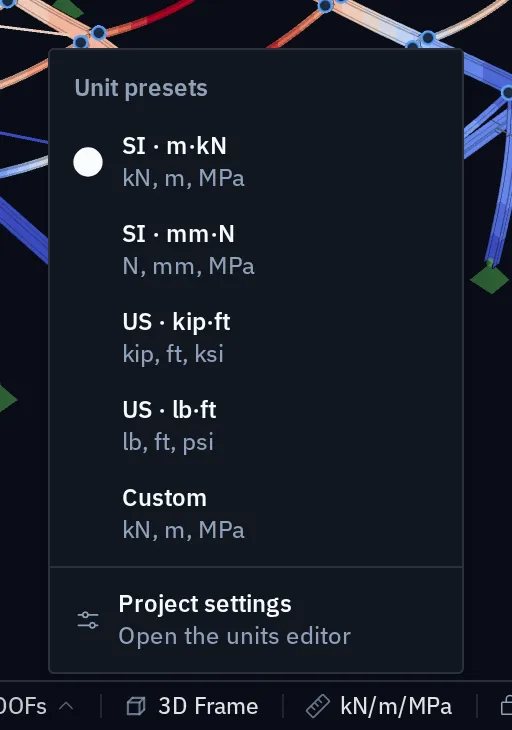
- Changing the display units never changes the model. Switch a project from kN and m to N and mm and every number redisplays; nothing is re-entered or rounded.
- The report says what unit every quantity is in. The project chapter carries a legend for exactly this reason — see Exporting a report.
The unit system is chosen when the project is created and can be changed afterwards from the status bar, where the current system is shown at the right-hand end, or under Project settings › Units. Four presets cover every quantity, from forces to section moduli to temperature:
| Preset | Force · length · stress | Line load | Surface load | Sections |
|---|---|---|---|---|
| SI · m·kN | kN · m · MPa | kN/m | kN/m² | mm |
| SI · mm·N | N · mm · MPa | N/mm | N/mm² | mm |
| US · kip·ft | kip · ft · ksi | klf | psf | in |
| US · lb·ft | lb · ft · psi | plf | psf | in |
Change any single quantity in the project settings and the system becomes Custom. A new project starts in the units of your browser's region, US customary for an en-US browser and SI otherwise, and the quickstart sets it in the first step.
Where the factors of a thousand come from
| Quantity | The trap |
|---|---|
| Section properties | in mm⁴ is times in m⁴. An IPE 400 has |
| Young's modulus | Steel is . Entering 210 with the wrong unit gives a structure a thousand times too soft |
| Distributed load | kN/m on a member; kN/m² on a surface. A slab load applied to a beam needs the tributary width multiplied in |
| Surface results | kNm/m and kN/m, per unit width. A slab moment of 45 is 45 kNm per metre of strip, not 45 kNm |
| Bedding modulus | kN/m³ for ; a line support takes in kN/m per metre, which is kN/m² — see Elastic foundations |
| Density | kg/m³ for mass, but kN/m³ for self-weight. Steel is 7 850 kg/m³ ≈ 77 kN/m³; a density typed as 7.85 (t/m³) or 78.5 (kN/m³) gives a structure a thousand or a hundred times too light |
| Rotational springs | Moment per radian (kNm/rad), not per degree |
Sections and materials are defined once and reused, so a mistake in one is repeated everywhere the definition is used. When a whole model is off by the same factor, check them first — see Sections and materials.
Per unit width, once more
The most common unit error in slab and wall design is silent: a surface result in kNm/m
read as if it were kNm. The number looks plausible either way, and reinforcement sized
from it is out by the strip width.
Angles and directions
Rotational results and rotational stiffnesses are in radians: a nodal rotation of 0.002 is 0.002 rad, and a rotational spring is so many kNm per radian. If a rotational spring seems to do nothing, check that its stiffness was not worked out per degree:
Direction is not a unit, but it fails the same way. Gravity acts in negative global Z. A downward load is a negative value in the global system, or a positive magnitude with a downward direction, depending on how it is applied. A load in a member's local direction acts perpendicular to that member, which on a sloping rafter is not vertical — see Load cases.
Imperial and mixed practice
An AISC design or an ASCE 7 combination set does not require US units; the check reads SI internally like everything else and displays whatever the project uses. For the projects that work in US customary units, they are first-class:
- Every printed unit follows the project: tables, the properties panel, the section and material editors, load summaries, captured figures and the report.
- Line loads are klf or plf, never kip/ft, so a line load cannot be read as a kip-ft moment.
- Feet and inches. Fields accept
5'6",5'-6 1/2",6 1/2", mixed fractions,kfor kip and sums such as10ft + 6in. Project settings › Units › Write feet as can show lengths as feet-inches, to the nearest 1/16", with a value that does not round exactly marked ≈. - The AISC Shapes Database v16.0 is a section library of its own, 1 329 W, M, S, HP, C, MC, L, HSS and pipe shapes stored in US units, and A992 is the default steel of a US project. Tees and double angles are not in it yet.
- Conversions are exact, to the NIST definition of the pound-force, and the model is stored in SI either way, so switching between systems changes nothing but the display.
The section editor's free-form outline is still drawn in millimetres. Where a project mixes sources (a European section table in a US job, a supplier's data sheet in psi), convert at the point of entry and note the conversion in the report. Don't carry two systems in your head.
Useful factors, to four figures:
| From | To | Multiply by |
|---|---|---|
| kip | kN | 4.448 |
| kip·ft | kNm | 1.356 |
| ksi | MPa | 6.895 |
| psf | kN/m² | 0.04788 |
| in | mm | 25.40 |
| in⁴ | cm⁴ | 41.62 |
| kip/in | kN/m | 175.1 |
The three checks
Your first analysis works through these on a portal frame.
Something wrong or unclear on this page? Tell us, and it gets corrected.