Design checks
Utilisation ratios, governing cases and the clause behind every number a check reports.
Design checks 9 min read
A design check turns an internal force into a verdict. The utilisation itself matters less than the combination that produced it, the clause applied, and what was substituted into the formula. Elementarium reports all four.
In this section
- 01Forces entered by handCheck a member with no analysis or no model, or type over what the analysis gave, and what the row, sheet and report say about it.
- 02National annexesWhere nationally determined parameters change the answer, how to select the right annex, and what to state in the report.
- 03Section classificationHow EN 1993-1-1 Table 5.2 classifies a steel section, why the class depends on the combination, and what the check does with a section it cannot classify.
- 04Serviceability checksDeflection, drift and floor frequency checked member by member at SLS, to the national annexes, EN 1993-1-4, IBC, AISC or EN 1995-1-1.
- 05Stainless steel — EN 1993-1-4Stainless member resistance and deflection to EN 1993-1-4 — how a material is read as stainless, what is checked, and what is left to you.
- 06Steel — AISC 360Member strength to Chapters D to H, LRFD or ASD — compression buckling, lateral-torsional buckling and every C_b option written down.
- 07Steel — EN 1993-1-1Member resistance to §6.2 and §6.3 — what is checked at every station, where buckling lengths and M_cr come from, and the clauses left to you — with haunched members, cold-formed C and Z members and fire resistance.
The strength modules are all for steel, verifying member resistance at ULS: the cross-section and the member's buckling between its restraints. Carbon steel is checked to EN 1993-1-1 and AISC 360, with haunched and tapered members by the General Method of EN 1993-1-1 §6.3.4, cold-formed C and Z members and purlins to EN 1993-1-3, and fire resistance to EN 1993-1-2. Stainless steel is checked to EN 1993-1-4. Any steel section you draw or build up from plates can be checked, to EN 1993 and AISC 360. Beside them are serviceability modules for deflection, drift and floor frequency at SLS. What is not checked, in any module:
- Concrete strength, timber strength and aluminium strength. A member in any of these materials can be modelled, meshed, loaded and solved, and the material library carries them, but no strength check runs on it. Timber and aluminium deflection are in the serviceability modules.
- Floor acceleration, crack widths and plate deflection. The serviceability checks cover member deflection, drift and a floor-frequency screen; slab deflection is still read off its contour — see Linear static analysis.
- Connections. No connection model, so no net-section rupture and no joint checks.
What each release adds is recorded in the release notes.
How a check reports itself
Every utilisation expands to show:
| Element of the report | Why it is there |
|---|---|
| Utilisation ratio | The headline: design effect over design resistance |
| Governing combination | Which combination produced it, and at which position |
| Clause reference | The specific code clause applied, not just the standard |
| Substituted formula | The expression with your numbers in it |
| Intermediate values | Section classification, the resistances each clause needs, the partial factor applied |
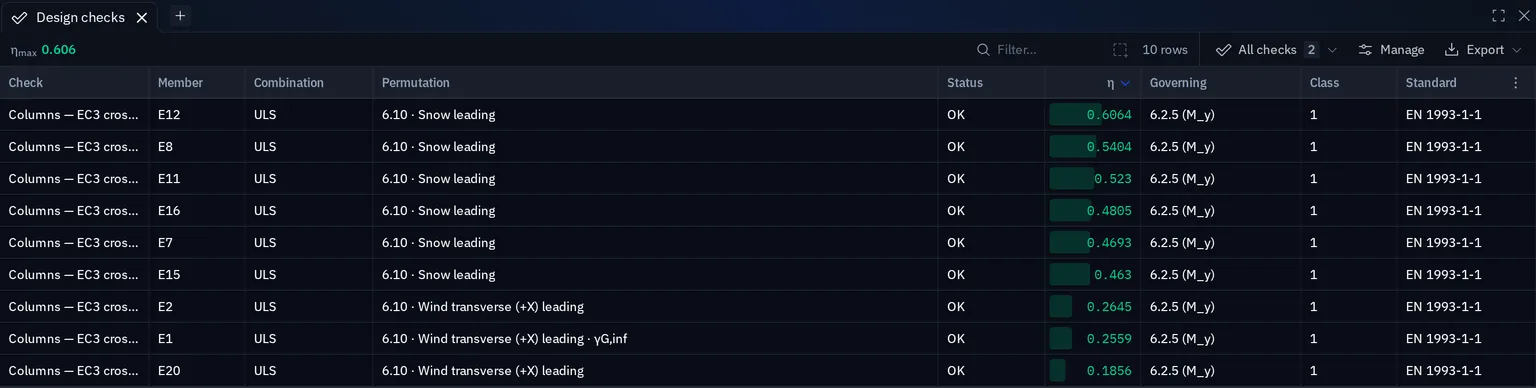
The Design checks dialog
Analysis › Design checks › Checks opens every check in the project. The rail on the left lists them under Strength and Serviceability, each with its worst η. The selected check has two tabs, Results and Setup.
Starting a check
New check opens a picker, grouped by code with the project's own code first. Each entry names what it verifies and the clauses it covers, and says how many members it fits (Applies to 288 of 288 members). A code that fits none of your members stays in the list. Pick with the arrow keys and Enter, or type to filter. The new check takes its name from what you picked, all members and the combinations of its limit state, so one choice is enough to give results. Create check adds it.
What a check verifies is chosen once. To verify something else, make another check.
Reading the results
The Results tab is one table with a row per member, worst first: Member, Section, Combination, η with its bar, Governing in plain words, Class and . A member with no number sits at the bottom with the reason, and where there is a fix the row offers it: forces older than the model offer Solve, a wrong combination offers Change combinations. Above the table:
- The capacity ruler is the η axis from 0 past 1.0 with a tick for each member. Point at a tick to read the member, click it to select the row, and drag across a range to filter the table to it.
- The what governs strip splits the members by the clause that governs them. Click a segment to filter.
- The filter line counts Pass, Over, Not verified and Not solved, and holds the search box.
- By section groups the table by section instead: members, worst η and its member, how many are over, and total mass.
After a re-solve or an edit, each row shows how its η moved in a Change column, with the old value on hover, and Changed filters to those rows. This comparison is kept for the session and is not saved in the project.
Open a row and every combination the member is verified under is listed, worst first. Open any number of them. Each lists its clauses with their η and what it read, such as and , and each clause opens to its equation with your numbers in it. Calculation sheet gives the full derivation, the same one the report prints, and Show in model steps the dialog aside with the member lit. Results panel shows the rows of every check in the dock, with no dialog in the way. An open row stays open when the check runs again.
Changing a check
A change on the Setup tab waits for Apply. Nothing is recomputed while you edit, and the results on screen stay those of the stored settings until you apply. Revert or Esc takes the changes back, and closing the dialog asks before discarding them.
The lightest section that passes
Checks verify the section you assigned, but they can also tell you what else would do. When a row is over capacity, or under 0.5, opening it offers the lightest section of the same catalogue family that passes: HEB 300 → HEB 340 with its η and the change in mass. By section makes the same offer for all the members on a section when you open it.
The offer runs the same module with the same inputs on each section of the family, from the lightest up. It is applied only when you press Apply to this member, or Apply to all 24 members for a section. That is one undo step, and the model re-solves. Until then the forces are those of the section you have now, so the η offered is not yet the η you will get on a frame whose stiffness changes with the section.
There is no offer in these cases:
- the section isn't from a catalogue;
- the check reads displacements, as deflection, drift and frequency do;
- its buckling lengths come from a stability analysis, because displacements and belong to the section they were solved on;
- a combination the check reads has no result yet.
If nothing in the family passes, the row says so.
In the viewer
The Design utilization plot colours members by utilisation. Each viewer has its own selector under the plot: Worst of all checks, or one check. Two viewers can show two checks side by side.
When checks run
After a solve, checks run in a background worker, so the editor stays responsive. Rows fill in as members finish, and the dialog shows the progress as Checking… 40 of 288 members.
What is checked, and what is not
Checks run member by member, on solved results or on forces you enter by hand. They do not cover connections, foundations, detailing beyond the clauses cited, fatigue, or stability of the structure as a whole. Fire is covered only by the EN 1993-1-2 module, for steel members in a nominal fire.
Each module states its own boundary:
| Cross-section resistance | Member buckling | |
|---|---|---|
| EN 1993-1-1 | §6.2, Class 4 on the effective section, web shear buckling and transverse forces to EN 1993-1-5 | §6.3: flexural, torsional, torsional-flexural and lateral-torsional buckling, the 6.3.3 interaction with Annex A or B, the §6.3.4 General Method, and §6.4 built-up members |
| Haunched members, EN 1993-1-1 | §6.2 at every station, on its own section | §6.3.4 with the tapered member's own lateral-torsional eigenvalue |
| EN 1993-1-3 | §6.1 on the effective section of §5.5 | §6.2, and §10.1 for purlins held by sheeting |
| EN 1993-1-2 | §4.2.3 at the steel temperature reached | Buckling and lateral-torsional buckling in fire, and the critical temperature |
| EN 1993-1-4 | §6.2 of EN 1993-1-1 with the classes and of EN 1993-1-4, Class 4 on the effective section, shear buckling to §5.6 | §5.4: flexural, torsional, torsional-flexural and lateral-torsional buckling, and the §5.5 interaction |
| AISC 360 | Chapters D, F, G, H | Chapter E compression buckling, slender elements and single angles included, and lateral-torsional buckling inside Chapter F |
Anything a module does not verify is raised as a message on the check itself and carried into the report's assumptions and limitations section.
Module versions, and what a pin does
A check stores which module it uses and which version of it. Re-open the project after an app release and the check stays on that version. A pin keeps what the module covers: a feature added in a newer version does not reach the check until you take it. The setup says when a newer version exists, and Update to v1.2.0, or whichever it is, re-runs the check on it.
A pin does not keep a module's errors. A correction to how a clause is computed reaches every version of the module, pinned ones included, with no action from you. So a check's numbers can change after an app release, in either direction, and a number in a report issued last quarter is not guaranteed to be the number the model produces today. The exported report is the record of what was issued, and it prints the module version it was made with. When the release notes list corrections, look over your checks again, starting with the members the corrected clauses govern.
When a module's scope widens, the wider one gets a new name, because it changes the numbers. Adding §6.3 to the EN 1993 check, or Chapter E to the AISC one, raises the utilisation of every compression member. So the member-resistance modules supersede the earlier cross-section and member-strength modules, which stay available for the checks created with them and receive corrections like any other. A check on an older module says that a wider check replaces it, and Switch moves it when you choose to.
Clauses corrected in 0.8.0
Before 1.0 we went through the steel checks and the load combinations against the code texts. These are the clauses whose results changed in 0.8.0:
| Code | Clause | Now |
|---|---|---|
| EN 1993-1-1 | Table 3.1 | is reduced for steel thicker than 40 mm |
| EN 1993-1-1 | Table 6.5 | Welded I-sections take the welded buckling curves |
| EN 1993-1-1 | 6.2.10 | High shear reduces the axial part of N + M as well |
| EN 1993-1-1 | 6.3.3 | Biaxial bending without axial force runs the interaction |
| EN 1993-1-1 | Table B.1 | Class 1 and 2 RHS take their own row |
| EN 1993-1-1 | Table B.3 | about an axis with a sway buckling length |
| EN 1993-1-5 | Table 4.2 | An outstand with its tip in compression takes the free-edge case |
| EN 1990 | 6.10b | reduces only the unfavourable permanent action |
| EN 1990 | 6.10 | Prestress is factored by , not |
| AISC 360 | Table B4.1b | HSS wall flat width is |
| AISC 360 | H1-1b | Biaxial bending without axial force is summed through H1-1b |
0.8.1 went through the checks again against the code texts and printed worked examples, and 0.8.2 once more against the code texts. Those corrections apply to existing checks too. The release notes list them by release.
Reading utilisation sensibly
| Utilisation | Reading |
|---|---|
| Above 1.0 | The member fails the clause under the governing combination |
| 0.95 to 1.0 | Passes, with nothing left for the change that always arrives |
| Below 0.3 | Often governed by something else (deflection, buildability, a minimum section), which is fine; or the load never reached it, which is not |
Something wrong or unclear on this page? Tell us, and it gets corrected.