What Elementarium does today.
The modeler, the mesher, four analyses, the code checks and the report, written down in enough detail to decide whether it fits your work.
- 01 ModelingBeams, bars, slabs, walls and shells over a DXF underlay, or 35 generated structures. IFC and SAF import, and export on Pro.
- 02 ElementsFive element types. A shell that locks in neither shear nor in-plane bending, with a true drilling DoF.
- 03 MeshingAll-quad, guaranteed. Graded, one shared mesh for slab, wall and beam.
- 04 LoadsCases, groups and combinations to EN 1990 or ASCE 7. Wind and snow generated to EN 1991.
- 05 AnalysisLinear static, modal, linear buckling and second-order P-Δ.
- 06 ResultsDiagrams, contours, envelopes and tables. Singular models caught first.
- 07 WorkspaceDock any panel anywhere, with snapping splitters. As many viewports as the job needs.
- 08 Design checksSteel to EN 1993-1-1 §6.2–6.3 and AISC 360 D–H, buckling included, clause by clause. Deflection, drift and floor frequency at SLS.
- 09 ReportsA calc package with the hand calculations substituted in.
- 10 Devices & teamsEvery device, offline edits, live collaboration, comments and version history.
- 11 EngineC++ compiled to WebAssembly, threaded, running on your CPU — and a live monitor while it does.
- —On the roadmapConcrete design, steel connections, material nonlinearity, section cuts.
01
Draw what is on the drawing
You model members, slabs and walls; the program turns them into elements. A slab is an outline and a thickness, and the mesh is generated for you. Supports and releases go straight onto the structure.
Rolling out soon A Winkler bed under the face of a raft isn't switched on yet. Line supports are.
- Draw over the architect’s DXF
- Import a DXF and it becomes a reference drawing under the model, in its own units, placed where you put it. Snap to its lines, arcs and endpoints as you lay members out, and the frame lands on the grid the architect already drew.
- Surfaces drawn as surfaces
- Outline the slab, the wall or the core, punch the openings, set the thickness. It meshes into four-node shells and solves with the frame around it. One model — not a slab model and a frame model that disagree.
- Start from a generated structure
- Thirty-five parametric structures — parallel-chord and roof trusses, portal and multi-storey frames, arches, grillages, towers, domes, a pipe rack, a silo, a cooling tower, a culvert — each drawn with its dimension lines while you set them. It lands in a new project or beside the model you have, with members, plates, supports and loads in the case you pick, and joins any node it touches.
- Sections & materials
- Assign a section and a material once and reuse them everywhere. Change the definition and every member carrying it updates, with nothing to rebuild.
- Supports & releases
- Every direction is free, rigid or a spring with a stiffness you choose, in global axes or in a skew frame of your own. Release individual degrees of freedom at a member end — fully, or partially with a rotational stiffness.
- Rigid arms & eccentricities
- Constrain degrees of freedom instead of faking stiffness with a very stiff member. Rigid arms tie an offset node to its master; a beam can also carry its own eccentricity, so a downstand sits where it really is.
- IFC and SAF in and out
- The IFC structural analysis view (IFC2X3, IFC4, IFC4X3) and SAF 2.2 workbooks import on every plan and export on Pro: a model arrives from a BIM tool, SCIA or RFEM and goes back with its GlobalIds intact.
- Line supports on a Winkler bed
- Support a whole member or one edge of a slab with a stiffness per unit length: grade beams, strip footings, a wall under a slab. The subgrade modulus is your input, lumped onto the mesh by tributary length, and the total survives any remesh. A bed under the face of a raft is still to come.
02
Five element types. One of them does every surface.
Each element type documents its degrees of freedom, what it carries and what it cannot represent, so a surprising result can be traced to the formulation instead of guessed at.
| Element | Nodes | DoF | Carries | Used for |
|---|---|---|---|---|
| Bar | 2 | 3 / node | N | Truss chords, bracing, ties, struts |
| Beam | 2 | 6 / node | N · Vₑ · T · Mₑ | Frames, columns, girders, purlins |
| Shell · MITC4 + EAS | 4 | 6 / node | mₓ · mᵧ · mₓᵧ · v · nₓ · nᵧ · nₓᵧ | Slabs, rafts, walls, cores, deep beams, tanks |
| Spring | 1 or 2 | Per DOF | Stiffness | Bearings, soil springs, joint flexibility |
| Rigid arm | 2 | Constraint | — | Eccentric joints and offsets |
The surface element
Four parts, and why none of them locks
- Nodes
- 4, quadrilateral · 6 DOF each
- Kinematics
- Reissner–Mindlin
- Bending, shear
- MITC4 (Dvorkin–Bathe)
- Membrane
- EAS-4 enhanced strains
- Drilling
- Hughes–Brezzi, no spring to ground
- Warped quads
- Corrected, rigid motion stays rigid
- Locking
- None in shear at any t/L, none in in-plane bending
- Recovery
- SPR, ZZ, average or raw
- One element for every surface
- The element carries membrane and bending action together, so a floor slab, a shear wall and a tank wall are the same element under different loading. Nothing to choose between, and no incompatibility where a wall meets a slab.
- Beam-to-wall joints carry moment
- The element has a drilling degree of freedom, giving it all six at every node. A membrane element without one cannot resist the in-plane moment a beam brings, so the joint acts as a pin whether you wanted it to or not. Here the moment transfers unless you release it yourself. The drilling stiffness is tied to the membrane's own rotation (Hughes–Brezzi), not a spring to the ground, so it never resists a rigid rotation, never depends on the units, and never stiffens a curved shell where its facets meet at an angle.
- It does not lock
- Transverse shear strains are interpolated tensorially from the element edges rather than differentiated out of the displacement field, so a 200 mm slab and a 1.2 m raft use the same formulation. In plane, four enhanced strain modes absorb the parasitic shear that stiffens a plain four-node membrane: a cantilever wall one element deep reaches 99 % of its tip deflection, where the plain membrane reaches 68 %. No thin-versus-thick choice to get wrong, no stabilisation factor to tune, and walls and deep beams need no special mesh.
- Beams do not need meshing
- Bending uses cubic Hermitian interpolation, which gives exact nodal displacements for a prismatic member, and the forces between the nodes follow from the member load by statics. Subdividing a beam changes where results are reported, not what they are.
- Distortion costs accuracy, not sense
- The element passes the patch test in membrane and in bending and has no spurious zero-energy modes, and a warped element on a curved or twisted surface is corrected so that a rigid motion strains nothing. Skewed elements around an opening or a re-entrant corner lose accuracy gradually rather than producing nonsense. They do lose it: a strongly tapered element is stiff in in-plane bending, as every four-node membrane is, which is why the mesher keeps elements square and the convergence test is the one a reviewer accepts.
- You choose how corners are recovered
- Resultants are evaluated at the integration points and carried to the corners by superconvergent patch recovery (the default), Zienkiewicz–Zhu L² projection, a plain nodal average, an area-weighted average — or not at all. Turn smoothing off and the jump between adjacent elements is visible, which is the cheapest mesh-adequacy check there is.
03
An all-quad mesher built for this element
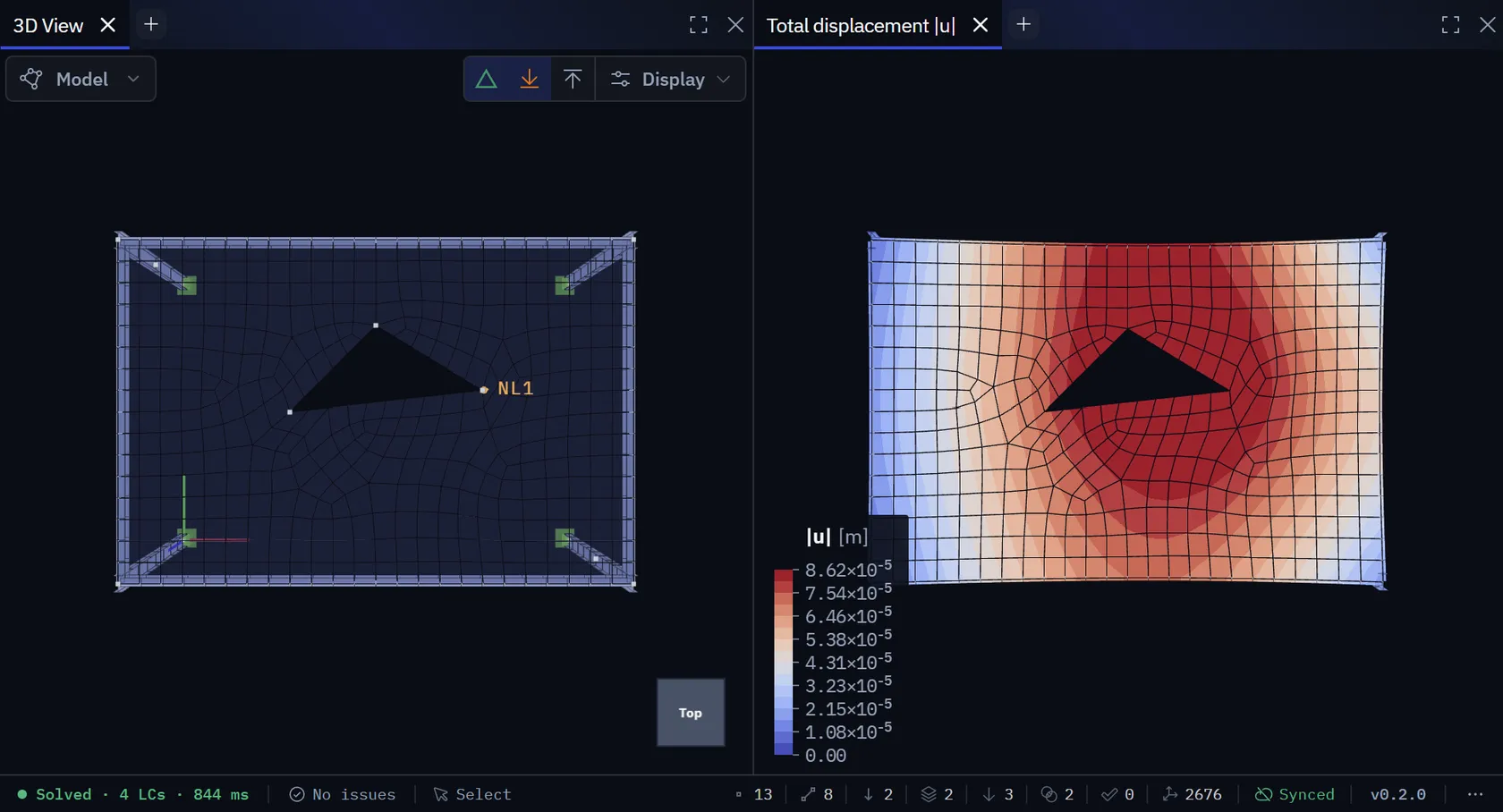
Every surface comes out as four-node quadrilaterals, guaranteed. The shell is a quad, so the mesher never falls back to a triangle, not even at the opening corner or the skewed edge where the result matters most.
Set one target size for the model, then override it where it matters: around supports, openings and load introductions.
- Quadrilaterals, every time
- Every surface meshes into four-node quadrilaterals, including around opening corners, at re-entrant notches and along skewed edges, where a fallback element would do the most damage.
- Global size, local override
- One target element size for surfaces and one subdivision count for members, then an override on the individual slab or member that earns it, and a cap on analysis element length across the whole model.
- Graded transitions
- The size field grows with distance from whatever asked for refinement — a gradient, not a step — and the refined zone is not ringed by the worst elements in the model.
- One mesh, not two
- Two slabs sharing an edge share its node chain, because the curve is discretised exactly once. A rib on a slab, or a beam along its edge, is embedded in that same mesh — which is what actually attaches it, rather than a coincident row of nodes that only looks connected.
- Convergence evidence
- Re-mesh finer and compare. The change in the quantity you care about is the only convergence argument a reviewer accepts.
- Meshes on your machine
- The mesher is compiled alongside the solver and runs in its own worker. Redrawing an opening and remeshing takes a fraction of a second.
Beams are meshed too, for a different reason. A prismatic beam element gives exact nodal values for the beam equation, so in linear static analysis subdivision only moves where results are reported. Stability and modal analysis are where it counts: a member left as one element buckles some 22% high. So beam subdivision gets its own global target, a per-member override, and a minimum that modal analysis enforces on top of both.
04
Generated combinations, expanded in full
Define the cases, group them by action, and let the generator apply the code. Every combination expands into its equation, its leading action and its factors, so every row can be checked.
| ULS-01 | 6.10b | 1.15·G + 1.50·Qᵢₘₚ | lead · Imposed |
| ULS-04 | 6.10b | 1.15·G + 1.50·Qᵢₘₚ + 0.90·Qᵥᵥ | lead · Imposed |
| ULS-09 | 6.10b | 1.15·G + 1.50·Qᵥᵥ + 1.05·Qᵢₘₚ | lead · Wind |
| ULS-12 | 6.10a | 1.35·G + 1.05·Qᵢₘₚ + 0.90·Qᵥᵥ | lead · Imposed |
| SLS-02 | Char. | 1.00·G + 1.00·Qᵢₘₚ + 0.60·Qᵥᵥ | lead · Imposed |
What you can apply
- Point loads & moments
- Uniform & trapezoidal line loads
- Surface loads, uniform or linearly varying
- Load panels that hand a floor or roof pressure to the beams
- Edge loads along a slab boundary
- Self-weight from density, in any direction
- Prescribed displacements
- Thermal ΔT and a gradient across the depth
- Nodal and line masses, for modal analysis
- Wind and snow, generated to EN 1991-1-4 and EN 1991-1-3
- Cases, groups and relationships
- Group cases by action type and declare which ones can act together. The generator uses the groups you define and never guesses them.
- Generated to the code
- EN 1990 — 6.10 or the 6.10a / 6.10b pair, plus characteristic, frequent and quasi-permanent for serviceability — or ASCE 7-22, LRFD §2.3 and ASD §2.4. Every variable action takes its turn as the leading one, the EN 1990 and LRFD factors are editable fields rather than constants compiled into the solver, and the report prints the same table you saw on screen.
- Wind and snow from the geometry
- Draw the walls and roof, enter the site, and the generators zone every face, read c_pe or μ at its pitch, and write each direction and arrangement as a case in an exclusive group. Flat, mono- and duopitch, hipped and multi-span roofs; the report traces each pressure to its clause. Czech national annex zones built in.
- Loads in the member's own axes
- Line, surface and edge loads take a Global / Local switch: along the member, across either section axis, or normal to a plate. The load editor draws each one on the real geometry, with the supports and dimensions, and local axes travel through to the solver, the tables, the report, IFC and SAF.
- Envelopes over a set
- Maximum and minimum of any quantity across all ULS or all SLS combinations, each carrying the combination that produced it.
- Favourable permanent actions too
- The generator also emits every combination with the permanent actions taken as favourable — the set that decides uplift, and the one most often left out when combinations are written by hand.
The maximum and minimum at a position come from different combinations, so interaction checks are evaluated combination by combination, never off the envelope. That's why the governing combination reported for a check may not be the one that produced the peak moment.
05
Four analyses on one solver
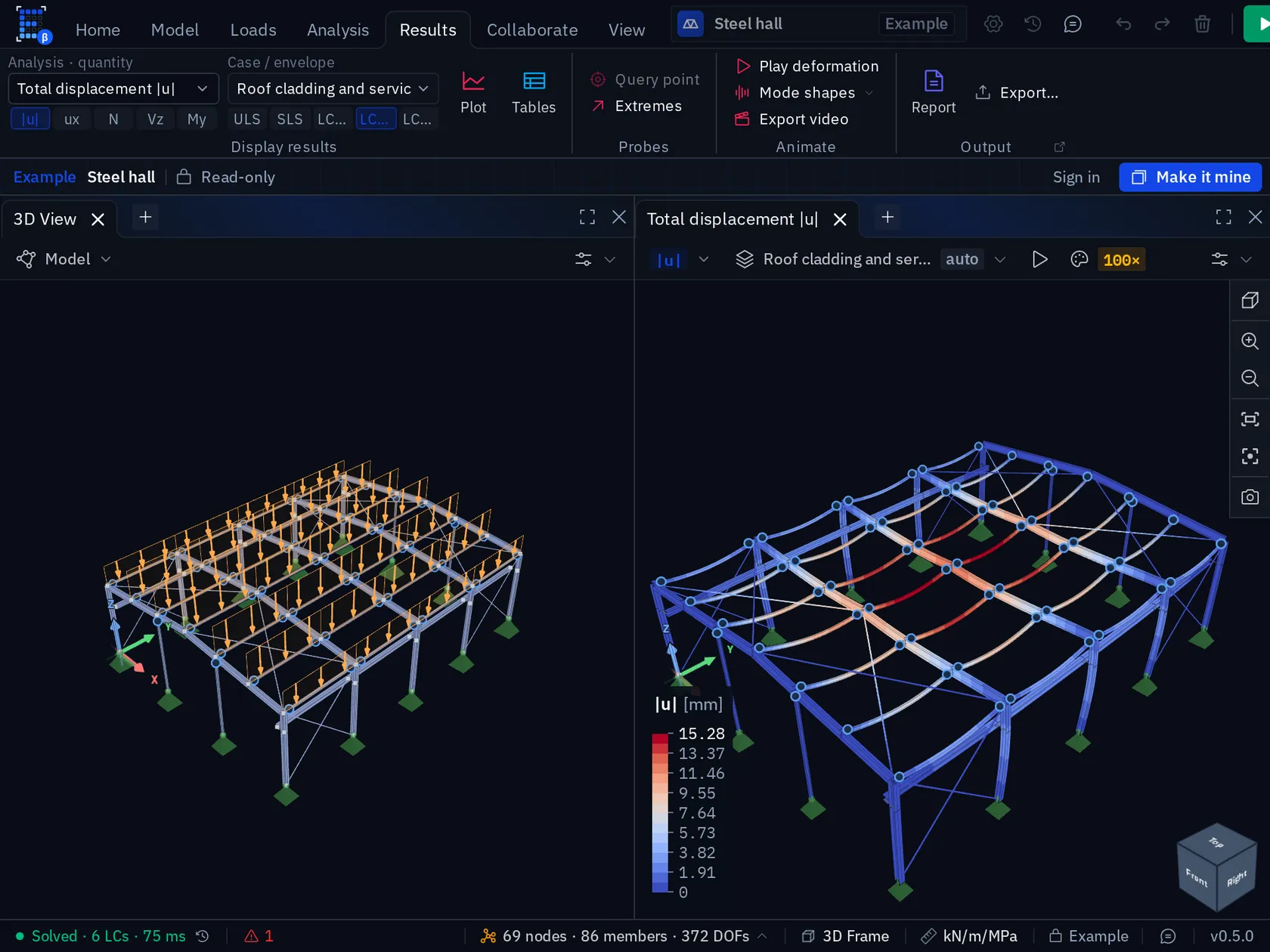
Strength, dynamics, stability and second-order geometry. Each is a named setup you can have several of, each keeps its own results, and each runs on your own cores.
K · u = f
Linear static
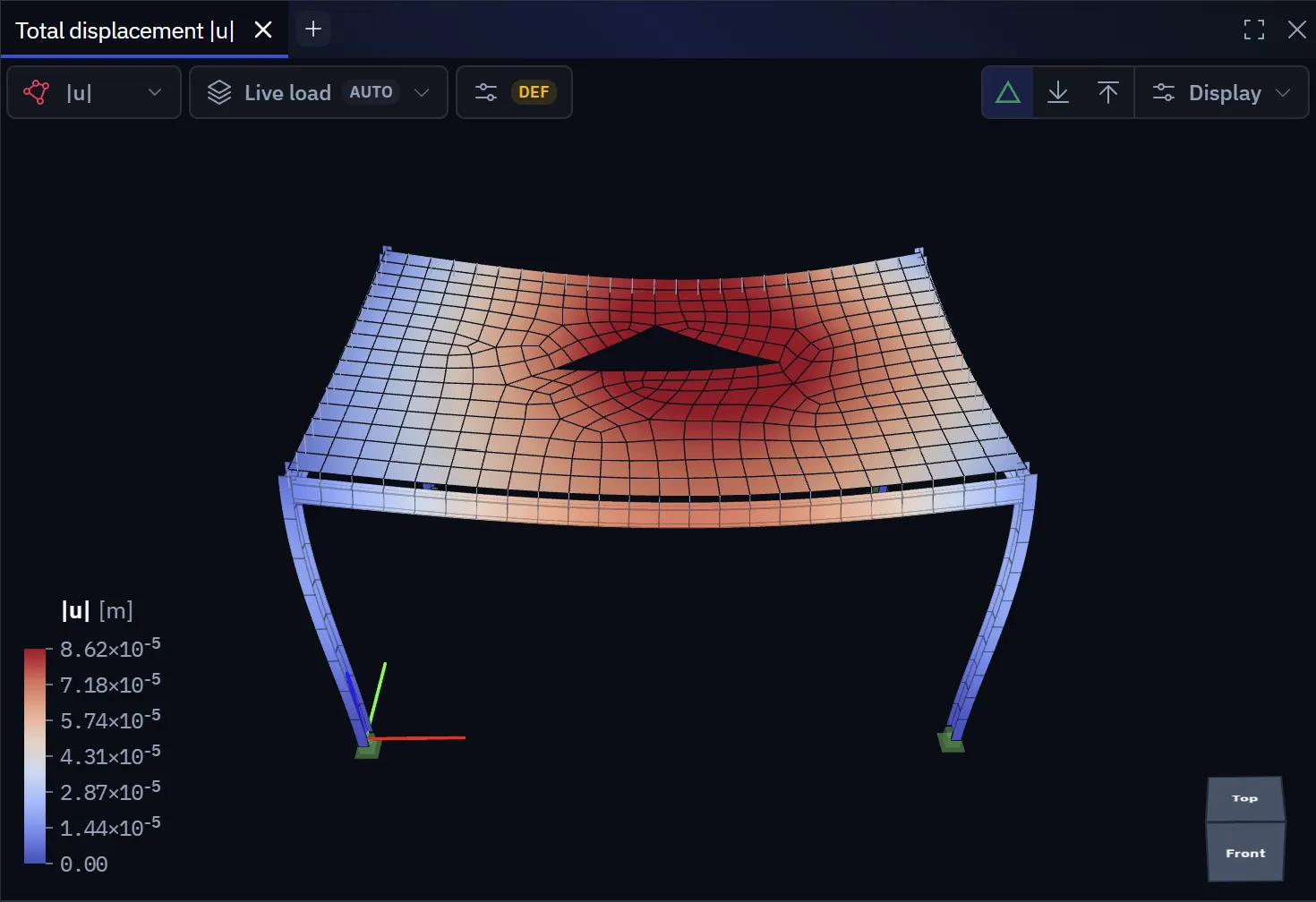
Assemble the stiffness matrix, apply the load case or combination, solve for displacements and recover internal forces. Fast enough to re-solve after every change.
- Displacements and rotations at every node
- N, V, T and M along every member
- Moment, shear and membrane fields across every surface
- Support reactions at every restrained degree of freedom
06
Results, with the governing combination
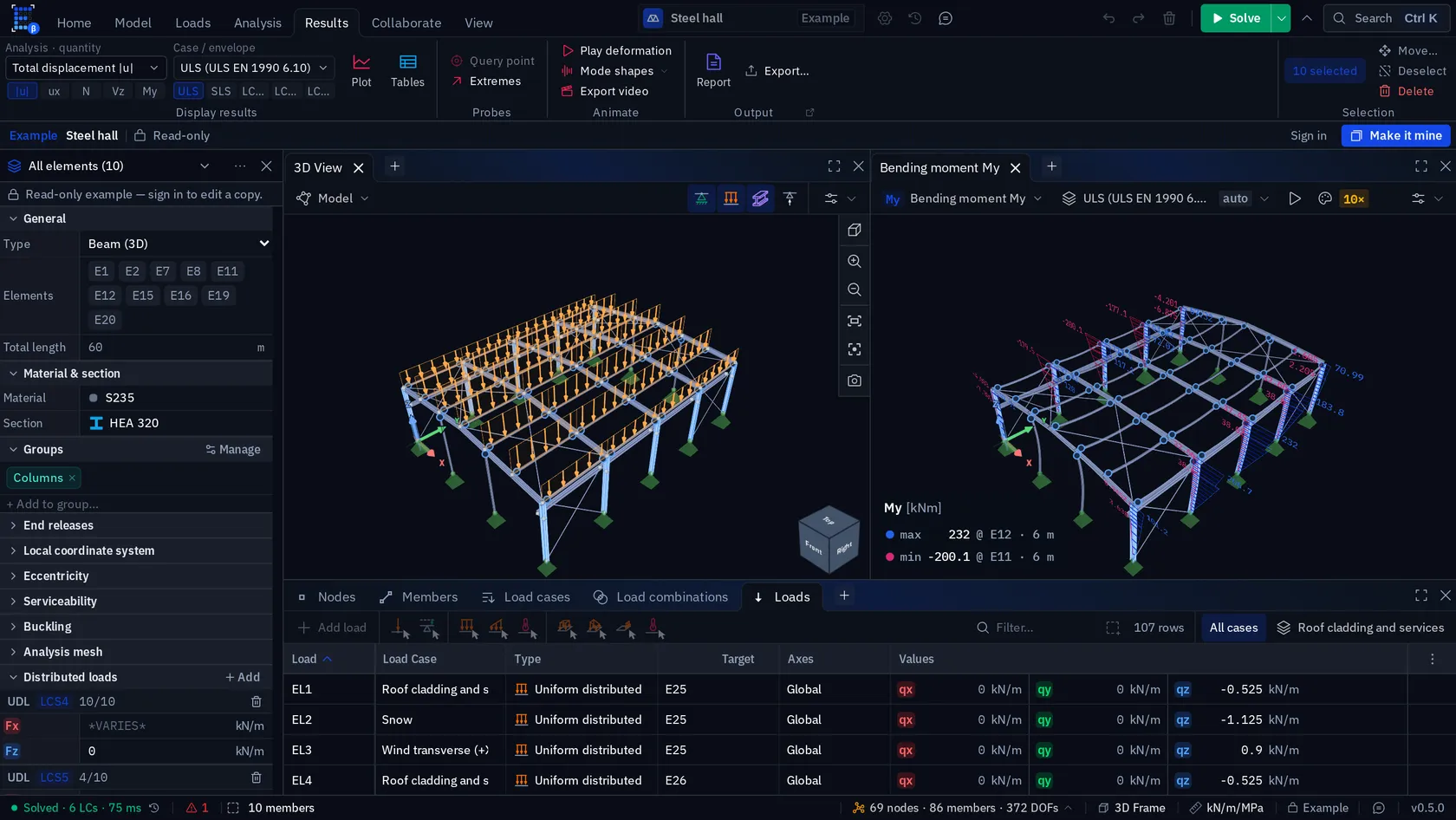
The picture and the numbers come from the same solve, with the governing combination attached to every extreme value on show.
- Diagrams on members
- N, V, T and M drawn on the structure, at a scale you set, with the peak and its position labelled.
- Contours on surfaces
- m_x, m_y, m_xy and the principal moments; v_x and v_y; n_x, n_y, n_xy and the principal membrane forces; stresses, strains and deflection — smoothed or raw. The gap between the two is a mesh diagnostic in its own right.
- Result tables
- Nodal values, element values and reactions, filtered, sorted and exported to a spreadsheet.
- Checked before it solves
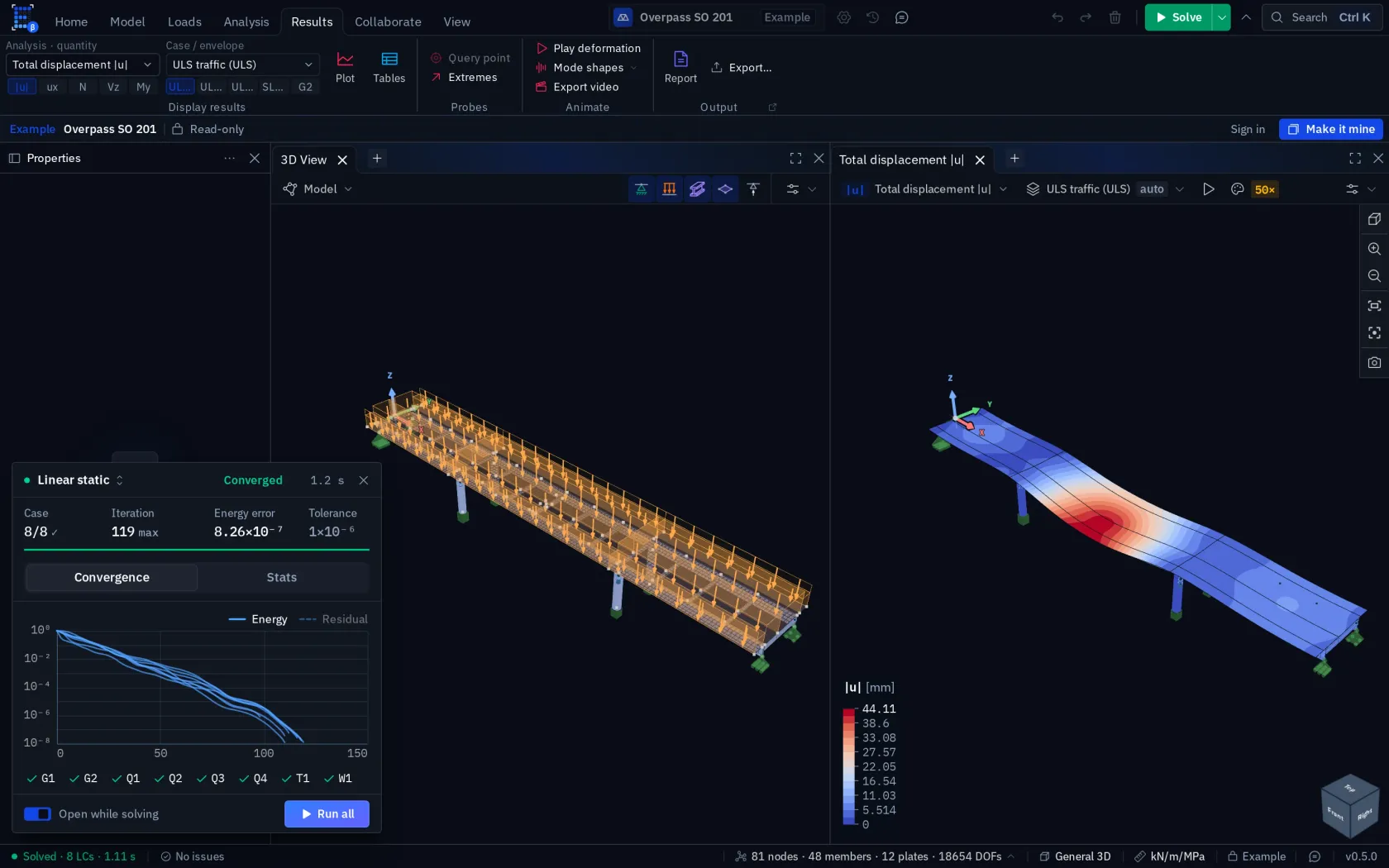
- A model with a mechanism has a singular stiffness matrix. Elementarium catches it before the solver does, names the cause — a hinge, a free node, a loose part — animates the motion, and offers the fix as one click.
- Two answers, side by side
- Each analysis is a named setup with its own results. Solve the same model with CG at 1e-6 and with a direct factorisation, pin one to each viewport, and compare.
- Animated, and on video
- Play the deformed shape, a mode or a buckling shape in every open viewer at once, and record a 3D viewer as a looping video with its title block and colour scale.
07
Panels you arrange yourself
Every part of Elementarium is a dockable panel, and the viewport isn't special: open a second, a third, a fourth, and give each its own quantity, combination and view angle.
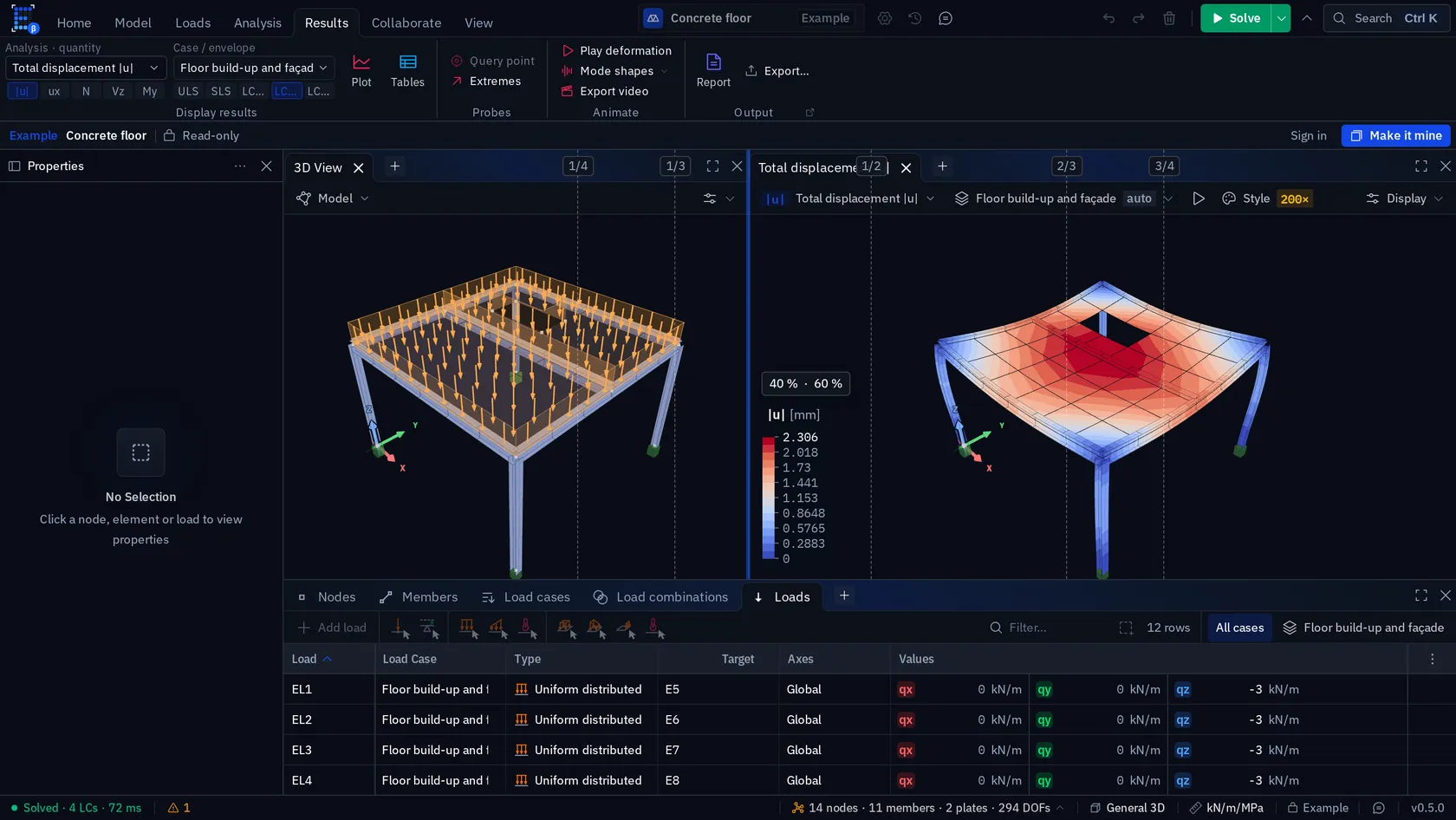
Every one of these docks
- 3D viewport
- 2D viewport
- Nodes, members & plates
- Supports & loads
- Load cases & combinations
- Nodal results
- Element results
- Reactions
- More than one viewer at a time
- Every viewport is independent: its own quantity, its own combination, its own view angle. Put m_x next to u_z next to the mode shape and read them together instead of cycling through one pane.
- Drag a tab, split a pane
- Drop a panel against the top, bottom, left or right edge of any pane and the space splits to take it. Drop it onto the middle of a pane and the two stack as tabs instead.
- Layout saved with the project
- The arrangement is saved with the project. Open it again and the panels are where you left them.
- Sensible on a small screen
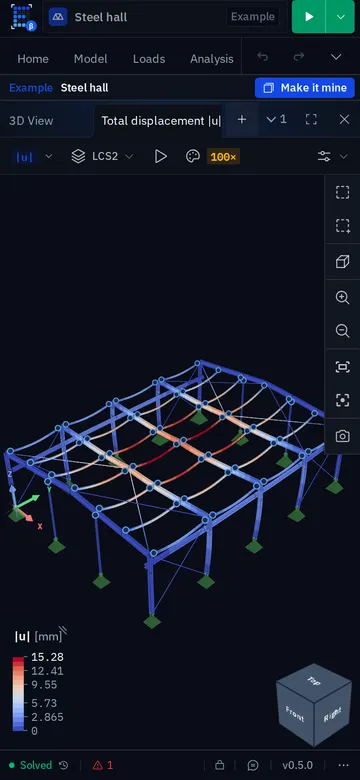
- On a phone the same panels become tabs, the Properties panel opens as a sheet with thumb-sized rows, and the ribbon, status bar and solve monitor step aside while you type.
08
Every utilisation traces to its clause
A utilisation ratio opens into the clause it came from, the governing combination, the position along the member and the substituted formula. Strength modules for EN 1993-1-1 and AISC 360 ship today, and serviceability modules for deflection, drift and floor frequency beside them. Each is versioned, so a check reopened next year resolves the implementation it was created with.
The national annex is set once per project: around forty of them, from ÖNORM to BS EN, plus IBC / AISC 360, ABNT NBR 8800 and SIA 26x.
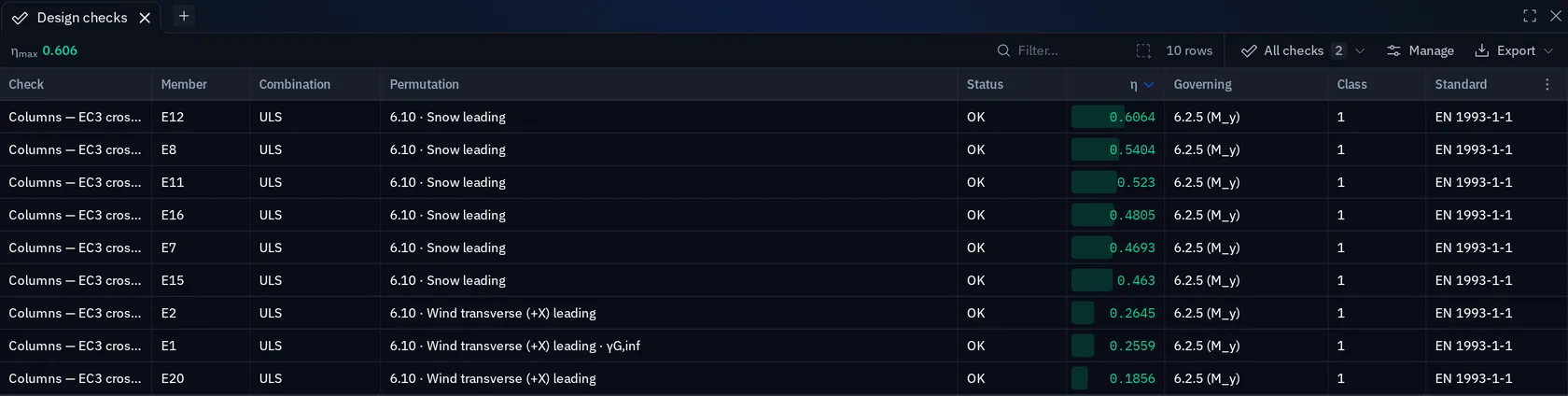
EN 1993-1-1 §6.2
steel cross-section and member resistance
- Tension and compression, N_t,Rd and N_c,Rd (§6.2.3 / 6.2.4)
- Bending about both axes, M_c,Rd, with the modulus its class allows (§6.2.5)
- Shear about both axes, V_pl,Rd (§6.2.6), and web shear buckling V_b,Rd (EN 1993-1-5 §5)
- St. Venant torsion T_Rd, and its reduction of V_pl,Rd (§6.2.7)
- Bending–shear interaction where V_Ed exceeds 0.5 V_pl,Rd (§6.2.8)
- Bending and axial force, plastic M_N,Rd biaxially for Class 1/2 I and H (§6.2.9)
- Class 4 on the effective section, A_eff and W_eff from EN 1993-1-5 §4.4 (§6.2.2.5)
- Flexural buckling about both axes, and torsional buckling of doubly symmetric sections (§6.3.1)
- Lateral-torsional buckling with M_cr, general or rolled-section route (§6.3.2)
- Bending with compression, (6.61) and (6.62) with the Annex B factors (§6.3.3)
AISC 360
steel member strength
- Tension, Chapter D2
- Compression, Chapter E: flexural and torsional buckling (E3, E4), slender elements on the effective area (E7)
- Flexure F2–F11, including lateral-torsional buckling
- Shear G2–G6 about both axes
- Torsion H3, for round and rectangular HSS
- Combined forces H1-1, axial with biaxial bending
- LRFD (φR_n) or ASD (R_n/Ω), and C_b from F1-1, Serna or a value you set
Serviceability
EN 1990 · IBC · AISC 360 · EN 1995
- Deflection limits from the national annexes — Czech, UK, French, Polish, Danish, Dutch — or EN 1990:2023 Table A.1.10, or IBC Table 1604.3
- Each limit on its own combination: characteristic, frequent or quasi-permanent
- Horizontal drift, overall and per storey: EN 1990 or AISC 360 h/400–h/600
- Floor frequency screen, 18/√δ (SCI P354) or 0.18√(g/Δ) (AISC DG11)
- Timber deflection with creep to EN 1995-1-1 §7.2: w_inst, w_fin and w_net,fin
- Spans read from the supports, or set per member, with precamber and cantilever factors
Not checked
and said so on the check itself
- Annex A interaction factors: Annex B is the one implemented
- Load height in M_cr: loads act at the shear centre, which is unconservative for a top-flange load, and the check says so
- Warping torsion — the 6-DOF beam carries St. Venant torsion only
- Concrete, timber and masonry strength: no design module ships for them yet
- Connections, base plates, foundations, fatigue and fire
09
The calculation package
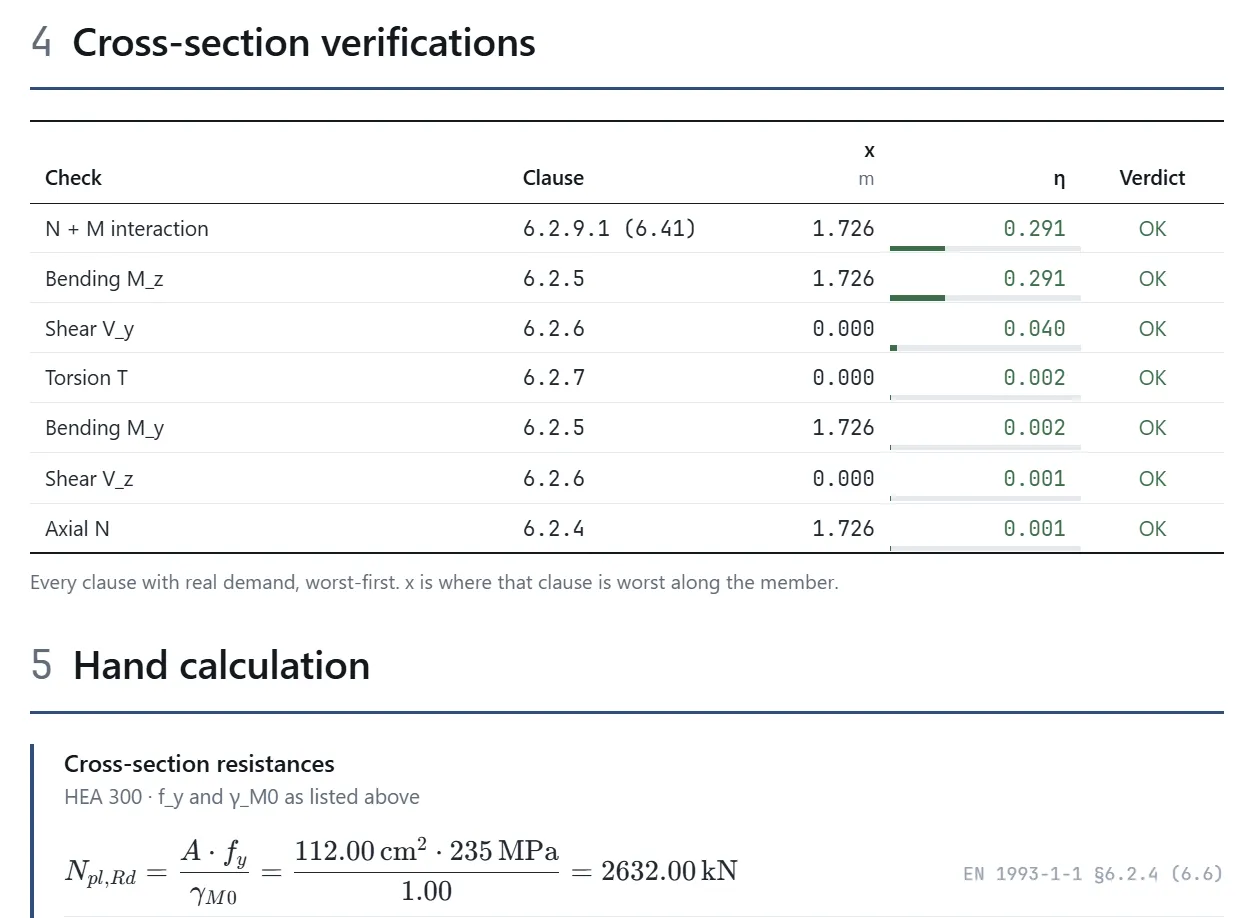
The output is a document another engineer can follow without your screen. Reports are generated from the solved model, so a change means a re-export, not a hunt through a PDF for the number that moved.
01
Project
Identification, client, author and design basis; a model summary with counts, model type and solver settings; and a legend saying which unit every quantity is in.
02
Structural model
A vector drawing of the structure with its supports, then node coordinates, the member schedule, supports, materials, cross-sections and groups.
03
Loads
Load cases with their action category, the combination table with its partial factors, every applied load with target and magnitude, and a figure per case.
04
Analysis results
Solver, DOF count and solve time; reactions, nodal displacements and min/max internal forces; deformed shapes and diagrams as figures.
05
Design verification
Worst utilisation per member with its governing clause, the per-clause breakdown, the fully substituted hand calculations, and the assumptions and limitations — which are never silently omitted.
- Presets
- Summary · Full calculation · Design only · Custom
- Detail
- All rows, governing only, or failing only
- Derivations
- None, governing, or every one
- Paper
- A4 or Letter, portrait or landscape, your margin
- Output
- Paginated on screen, then printed to PDF
10
Any device, the whole team
One application that runs wherever there's a modern browser. Not a desktop product with a mobile viewer bolted on: the whole solver, on the device in your hand, with the project synced to every other one.
A phone has fewer cores than a workstation, so a large model takes longer there. It is not a licence restriction.
| What you're doing | Desktop | Laptop | Tablet | Phone |
|---|---|---|---|---|
| Building and editing a large model | workable | — | ||
| Solving static, modal, stability and second-order | ||||
| Reading results, diagrams and contours | ||||
| Design checks and their clause traces | ||||
| Generating and sharing the PDF report |
- One URL, one account
- There is no per-device install and no seat to release. Sign in and your projects are there, on hardware you have never opened Elementarium on before.
- Input the device has
- Keyboard and shortcuts at a desk; pinch, drag and two-finger orbit on a touch screen; pen where the device has one. The same model, driven the way that device works.
- Pin it like an app
- Add it to the dock, the taskbar or a phone home screen and it opens full-screen without browser chrome. Still no installer, still updates itself.
- Offline on any of them
- Once a project is on the device it stays workable with no signal. Model, solve, check and report, then merge when you are back in range.
- Same model, same moment
- No check-outs and no master file. Two engineers in one structure see each other’s edits as they happen, and each solves on their own machine.
- Synced as you work
- The model is a CRDT: edits sync as operations, not whole-file saves, so there is no save button and nothing to transfer. Close the laptop, open the tablet, and the model is where you left it. Two people editing different parts both land; the same property resolves the same way on every device, whatever order the updates arrive in.
- Version history
- Checkpoints are taken as you work and named versions are kept for good. Preview any of them read-only, then restore it for everyone, or as a new project beside the original.
- Comments on the model
- Pin a thread to a node, a member or a point on a plate, @mention a colleague or a load case, and mark a point blocking so the report export warns until it is resolved.
Roles on a shared project
- Owner
- Everything, plus who else is in and whether sharing is on at all
- Read & write
- Model, load, solve, check, export
- Read
- Open, interrogate and export, but change nothing
With no connection
- Modeling, meshing and solvingworks
- Reading results, diagrams and tablesworks
- Design checks and report generationworks
- Opening a project for the first time on this devicewaits
- Seeing collaborators’ changeswaits
11
Inside the solver
The core is a C++ finite element library compiled to WebAssembly. There's no thin client talking to a server farm: the whole engine sits in the tab, on x86 and ARM alike, threaded where the browser allows and single-threaded where it doesn't.
- Core
- C++ → WebAssembly
- the same library, compiled for the tab
- Parallelism
- Up to 8 threads
- half the logical processors by default, where the page is cross-origin isolated
- Linear solvers
- CG, LLᵀ, LDLᵀ
- Jacobi (default), incomplete Cholesky or multigrid
- Mesher
- In-house, all-quad
- compiled alongside the solver
- Where it runs
- Your device
- no upload, no queue, no per-solve fee
- Model data
- Local-first
- cached on the device, synced when online
- No upload, no queue
- The model never leaves the device to be solved, so there is no transfer to wait for and no job in front of yours. Your client's model stays on your machine while it solves.
- You can watch it
- A solve that takes more than a moment opens a monitor beside the model: the load case, the iteration, a convergence chart per case and a Stop button. Its Stats tab recomputes the residual from the answer and estimates the conditioning, so a fast answer is also a checked one.
- It scales to the machine
- One WebAssembly build runs on x86 and ARM alike. Where the browser grants cross-origin isolation, every step of each iteration runs on up to eight threads — half the logical processors unless you set otherwise; where it does not, the same solver falls back to one thread rather than failing.
- Nothing to meter
- There is no compute to bill for, so a 200,000-DoF model costs exactly what a portal frame costs.
- Chrome, Edge, Firefox & Safari
- Windows, macOS and Linux alike
- iPadOS, Android and iOS
- No installer, no admin rights
- No licence server to keep alive
- Updates arrive by reloading the tab
On the roadmap
In roughly this order. Check the release notes before you plan a job around one of them.
01
Concrete design
EN 1992-1-1 bending, shear and serviceability. The most asked-for gap, and the next design module.
02
Material and contact nonlinearity
Second-order geometry is here. Yielding, cracking and supports that lift off are not.
03
Section cuts & design strips
Integrate a slab moment field across a cut and design the strip, rather than the peak at one node.
04
Scripting API
Automate parametric studies and pipe results into your own tooling.
Try it on your own model.
Three projects free, no card, nothing to install. Or open a solved example first, without an account.