Choosing a linear solver
Conjugate gradients with Jacobi, incomplete Cholesky or multigrid, or a direct factorisation — what each does, how to watch it, and when the choice matters.
Analysis types 9 min read
Every analysis ends in a linear system , and there is more than one way to solve it. Elementarium lets you choose, per analysis setup, between an iterative conjugate gradient method with a preconditioner and a direct factorisation. Most models are indifferent to the choice; some are not. The solve monitor shows either one converging while it runs.
The solvers
| Solver | Kind | What it does |
|---|---|---|
| Conjugate gradient — the default | Iterative | Improves an initial guess step by step until the relative residual falls below a tolerance you set. Stores the matrix and a few vectors, nothing more |
| Cholesky () | Direct | Factorises into a lower-triangular matrix and its transpose. Needs symmetric positive definite |
| Cholesky () | Direct | The same with a diagonal pulled out, so it also handles symmetric matrices that are indefinite — which is what the second-order iteration watches for |
The direct solvers are sparse: they exploit the fact that a stiffness matrix is mostly zeros, so the cost grows far more slowly than the square of the number of degrees of freedom would suggest. The matrix does not store the zeros inside each node's 6 × 6 block either.
All three run threaded where the browser grants cross-origin isolation — see Solver threads below.
Preconditioners for CG
Conjugate gradients converge at a rate set by the conditioning of the system. A stiffness matrix, with stiffnesses spanning orders of magnitude between a stiff column and a soft spring, is usually badly conditioned. A preconditioner transforms the problem into one that converges faster:
| Preconditioner | Cost per iteration | Effect |
|---|---|---|
| Jacobi (diagonal) — the default | Negligible | Removes the scaling differences between degrees of freedom. Cheap, fully threaded, and enough for frames |
| Incomplete Cholesky | Moderate | An approximate factorisation (IC0); usually cuts iterations by an order of magnitude, at the price of a sequential setup |
| Algebraic multigrid (AMG) | Higher setup | Attacks the long-wavelength error that Jacobi-CG resolves slowly. The strongest on large surface meshes |
| None | — | Plain CG, for comparison only |
Multigrid
Multigrid got three changes in 0.5.0 that make it the preconditioner to reach for on a model with plates — the analysis manager suggests Switch to AMG when it sees one:
- It is told about rigid-body modes. With Rigid-body modes on Auto, the coarse levels are built knowing how a shell or a frame moves when it is not strained, so a typical solve converges in tens of iterations rather than hundreds or thousands.
- Its default smoother is threaded. The smoother is now SPAI(0), which runs on every core. ILU(0), the old default, ran on one core and slowed down when threaded; it is still offered, marked as such. Chebyshev, Damped Jacobi and the sequential Gauss-Seidel are the other choices.
- It solves load cases together. Up to eight load cases share one pass through the multigrid hierarchy, using the processor's vector (SIMD) instructions — 1.2–1.7× faster on models with several load cases.
The cycle (V or W), the number of sweeps, the strength threshold and the size of the coarsest level are all exposed under the AMG settings. Leave them alone unless the Last solve readout gives you a reason not to.
Where the choice is made
Two places, the second overriding the first:
- Project settings → Analysis → Solver — the project default every analysis starts from.
- Analysis manager → Linear solver — per analysis setup. Use project defaults follows the project; Make default promotes this setup's choice to the project. The Last solve line reports what the settings did the last time this analysis ran: the most iterations any load case took, the worst relative residual recomputed from the answer, and the solve time.
Modal analysis has no linear-solver section; its eigenvalue settings are on Modal analysis.
The solve monitor
A solve that takes more than a moment opens the solve monitor beside the model. It shows the run as it happens: which load case is being solved, the current iteration out of the ceiling, the error, and a convergence chart with one curve per load case.
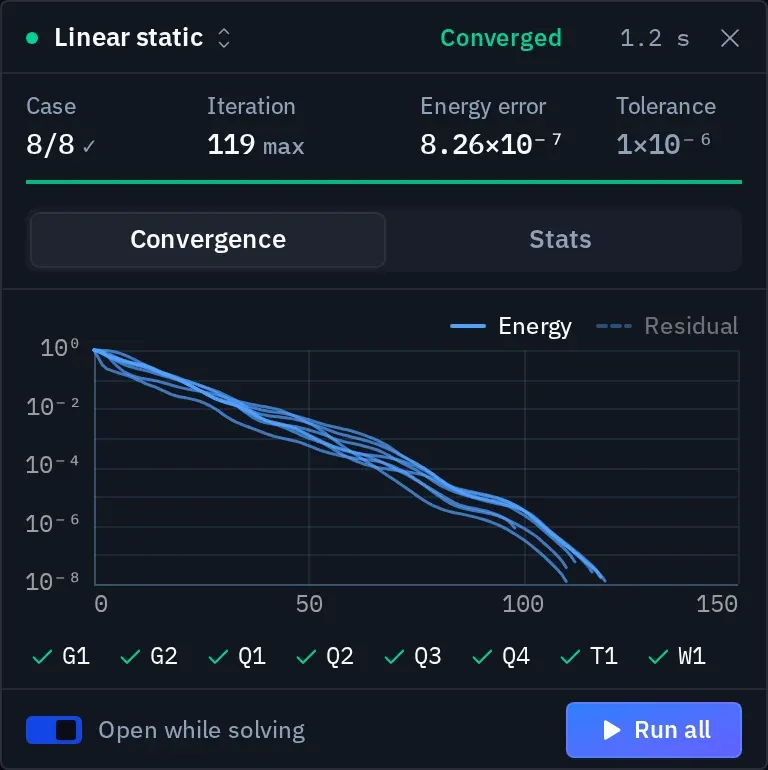
| Part | What it tells you |
|---|---|
| Header | The analysis, its state — Preparing, Assembling, Factorizing, Iterating, then Converged, Not converged, Stopped or Failed — and the elapsed time |
| Readouts | Case (this one of how many), Iteration, Energy error or Residual, and the Tolerance it is working to |
| Convergence tab | The error per iteration on a log scale, one curve per load case, the tolerance as a dashed line. A chip per load case: Converged, Solving, To solve, Did not converge |
| Stats tab | The run in numbers — see below |
| Footer | Open while solving, and Stop while it runs (Run / Run all when it has finished) |
The chart can plot two measures. The energy error is what CG minimises, so its curve never rises; it is the true picture of how close the answer is. The residual is what the tolerance tests, so it is what decides when a case is done; it can sit high, or climb for a while, as the answer improves. A direct solver reports neither: it has no iterations, and the monitor shows the factorisation instead.
Stop cancels the run cleanly between iterations. Results already solved stay; the rest are reported as not solved.
The Stats tab
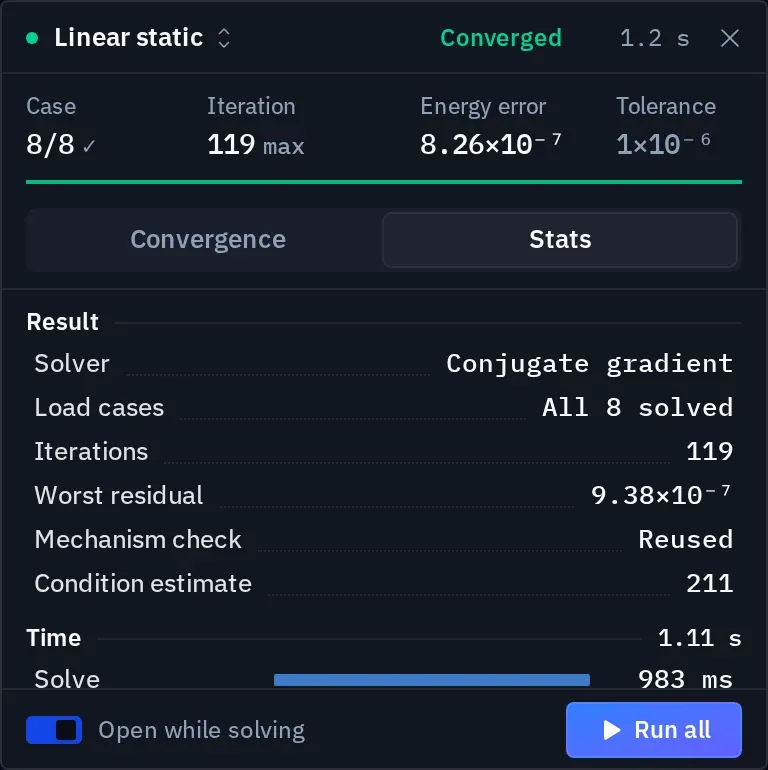
| Row | Meaning |
|---|---|
| Result, Solver, Load cases | What ran, with which method and preconditioner, and how many cases were solved |
| Iterations | The most any load case needed to reach the tolerance |
| Worst residual | recomputed from the answer, the largest over the load cases. It says whether the answer satisfies equilibrium, whatever the solver reported |
| Mechanism check | Whether the pre-solve check passed, or was reused from the last run |
| Condition estimate | How ill-conditioned is. Above about the answer loses digits — look for a near-mechanism or a very soft spring |
| Free rotations locked | Node rotations no member stiffens, such as truss joints, held so the system can be solved. They carry no result |
| Time | The run split into model build, solve, member forces, plate results, error estimate, displacements and reactions |
Last run and By analysis switch between the most recent solve and a summary per analysis setup. The header picker does the same for the convergence chart: Current solve follows whatever is running, All analyses lists them.
Solver threads
The threaded build splits assembly, the matrix product and — since 0.4.0 — every other step of each CG iteration across processor threads. How many is a setting:
- Settings → Solver engine → Threads — Automatic (the hint says how many are available) or a fixed count.
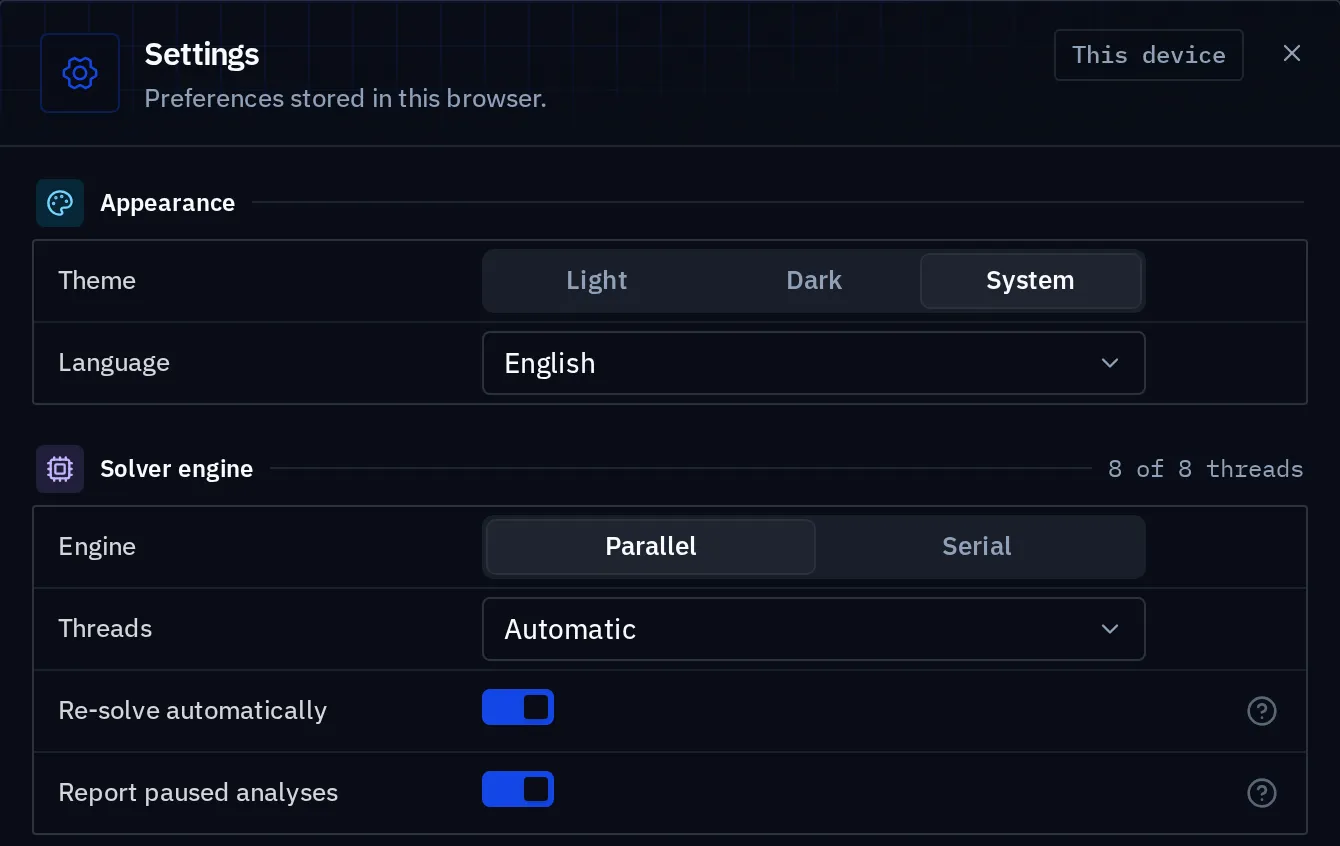
- Automatic takes half the logical processors, at most eight. Logical processors are usually two hyperthreads per physical core; an iterative solve is limited by memory bandwidth, so the second hyperthread adds a participant to every synchronisation and no bandwidth. Past eight threads, coordinating that many browser workers costs more than it saves.
- Solver engine itself is Parallel or Serial. Where the page is not cross-origin isolated, the engine runs single-threaded and the setting says so — see System requirements.
Fewer threads leave room for the rest of the machine — a video call, a second browser window solving something else. A fixed count can only lower the number: Automatic is also the ceiling.
Which to use
Start with the default. Conjugate gradients with Jacobi is cheap, threaded end to end, and converges quickly on frames and trusses.
Switch to multigrid when the model has plates and the solve monitor shows hundreds or thousands of iterations per case. Plate meshes are where Jacobi-CG is weakest and AMG is strongest. The overpass above is that case: 18,654 degrees of freedom, mostly deck shells. Jacobi-CG needs 3,147 iterations for its slowest load case; AMG needs 119. The worked examples ship with AMG.
Leave incomplete Cholesky for the odd ill-conditioned frame. Its setup and its triangular solves run on one thread, so on a large model it is the slowest of the three: the overpass takes around ten seconds under IC0 against one to two under Jacobi or AMG.
Use a direct solver when:
- you are solving the same matrix against many load cases and memory is not the constraint — the factorisation happens once and every case after it is a cheap pair of triangular solves;
- the model is badly conditioned and the iterative solver stalls (Did not converge);
- you want an independent check on an iterative result. Two different algorithms agreeing to five figures is evidence of a kind that re-running the same one is not.
Tolerance
CG stops when its estimate of the relative residual falls below the tolerance:
The default is 1e-6 with a ceiling of 10,000 iterations; the tolerance can be set
anywhere from 1e-12 to 1e-3.
| Tolerance | Use |
|---|---|
1e-6 | The default. The displacement error is bounded by the condition estimate times the residual: with a condition estimate in the hundreds, about four figures — still beyond any engineering need |
1e-5 and looser | Visible in the results: displacements and reactions carry the residual with them. A quick look, not a report |
The number to distrust is a loose tolerance on a badly conditioned model, where the residual can be small while the displacement error is not. The Worst residual and Condition estimate rows on the Stats tab are there to catch exactly that.
If two setups, one direct and one CG at 1e-6, disagree beyond the fourth figure, the
conditioning is poor and the reason is in the model: a very stiff spring, a section in the
wrong units, a near-mechanism. Solver errors lists
the usual causes.
Two answers, side by side
Each analysis in Elementarium is a named setup that stores its solver choice and keeps its own results. For a result you are not sure of:
- Create a second setup with a different solver — direct against CG, or a different preconditioner.
- Solve both, and compare their Last solve lines in the analysis manager.
- Pin one to each viewer panel and read the governing quantity in both.
The difference answers "does the solver matter here". It is almost always no, and now you can say so with a number instead of an assumption.
What the choice does not affect
The solver decides how is solved, not what is. Element formulation, mesh density, supports, releases and loads are the same for every solver, and every error in them is reproduced faithfully by all of them. A converged CG result and a direct result of the same wrong model agree perfectly.
Modal and stability analyses solve an eigenvalue problem rather than a linear system. Their settings (number of modes, mass target, the Sturm-sequence completeness check) are described on Modal analysis and Linear buckling.
Related
The direct stiffness method explains where comes from; Element formulations what each element contributes to it; the release notes record what each solver change did to solve times.
Something wrong or unclear on this page? Tell us, and it gets corrected.