Elementarium 0.8: closing in on 1.0
A clause-by-clause audit of the design checks, a rebuilt check dialog, stainless steel, hinges anywhere a structure has one, and a solver up to 1.8× faster.
We are near the end of the beta, so the last two weeks went on what a 1.0 has to be sure of: 0.7.1, 0.8.0 and 0.8.1 are mostly about whether the numbers are right, and only then about what is new. If you have checks in a project, read the next section first. The release notes have every line.
The audit, and what it changes in your checks
We went through every steel check and load combination against the code text, clause by clause, and then through the checks again against printed worked examples. It found real errors. These are the clauses whose results change:
| Code | Clause | Now |
|---|---|---|
| EN 1993-1-1 | Table 3.1 | is reduced for steel thicker than 40 mm |
| EN 1993-1-1 | Table 6.5 | Welded I-sections take the welded buckling curves |
| EN 1993-1-1 | 6.2.10 | High shear reduces the axial part of N + M as well |
| EN 1993-1-1 | 6.3.3 | Biaxial bending without axial force runs the interaction |
| EN 1993-1-1 | Table B.1 | Class 1 and 2 RHS take their own row |
| EN 1993-1-1 | Table B.3 | about an axis with a sway buckling length |
| EN 1993-1-5 | Table 4.2 | An outstand with its tip in compression takes the free-edge case |
| EN 1990 | 6.10b | reduces only the unfavourable permanent action |
| EN 1990 | 6.10 | Prestress is factored by , not |
| AISC 360 | Table B4.1b | HSS wall flat width is |
| AISC 360 | H1-1b | Biaxial bending without axial force is summed through H1-1b |
These corrections reach existing checks. A check is pinned to the version of the module it was created with, and that pin keeps what the check covers. It does not keep a bug, so a stored check's numbers can move, downward as well as up. Re-run your checks and look at the members these clauses govern before you issue a report made with an earlier version.
Some things the site used to list as not covered are now done: reads the height the load acts at, and a member can state where its load sits. Mono-symmetric sections get torsional and flexural-torsional buckling. Angles, channels and tees are classified, and the check says what it does not verify. In AISC 360, single angles go through E5 and F10, tees through F9. The Eurocode 3 and stainless modules are also read against published worked examples now, from SSAB, SCI and others, where before they were read against hand calculations only. Not every clause has a print to read against, and How it's checked says where that leaves you.
A check dialog that starts with the answer
The Design checks dialog used to put setup first and the answer last. The new one opens on the answer: every member in one table, worst first, with a capacity ruler above it and a strip showing which clauses govern. Open a member and each combination is listed worst first, each clause opening to its equation with the numbers put in.
From there, the loop closes. A member offers the lightest section of its family that passes, by running the same check on the same forces, and applying it is one undo step. Changes to a check wait for Apply, as an analysis's do, so nothing recomputes under you while you edit. A member with no result says why, and checks run in the background after a solve. See Design checks.
Three things are new in what can be checked:
- Stainless steel to EN 1993-1-4: member resistance and deflection, as a module of its own. Its partial factors, class limits, buckling curves, lateral-torsional buckling, interaction and shear all differ from carbon steel.
- Forces entered by hand: check a member against design forces you type, with no analysis and no model needed, or type over what an analysis gave. The row, the sheet and the report say that the forces were typed.
- A national annex per check. The project still sets the default, and one check can name its own.
Hinges where the structure has them
A hinge used to mean a release at a member end. Now it goes wherever the structure has one.
Along a plate edge. A line hinge lets a slab turn freely where it meets a wall or a beam, and the results draw the forces the hinge still passes across, right on the edge. Release every slab along a beam in one step, or one plate edge from its right-click menu.
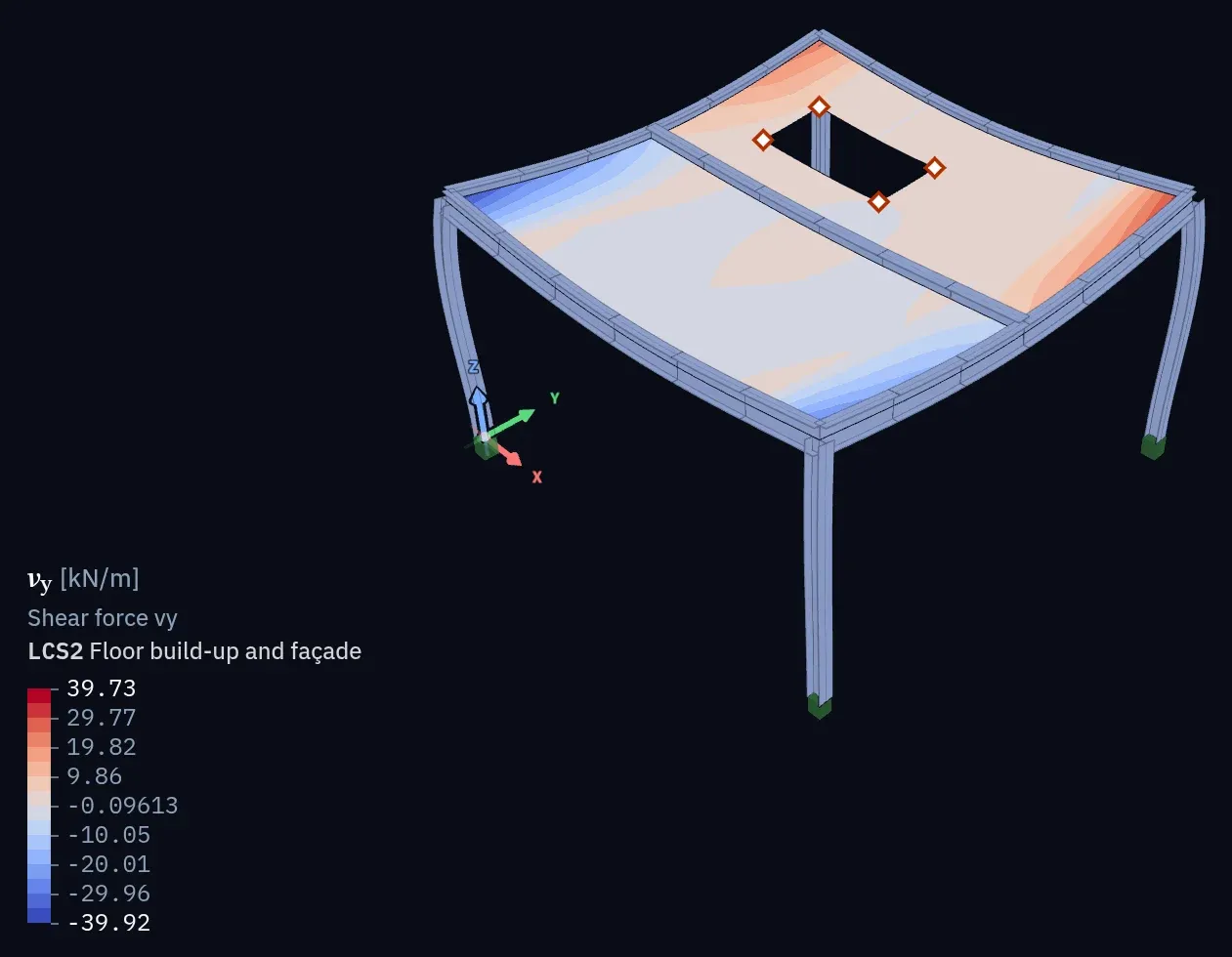
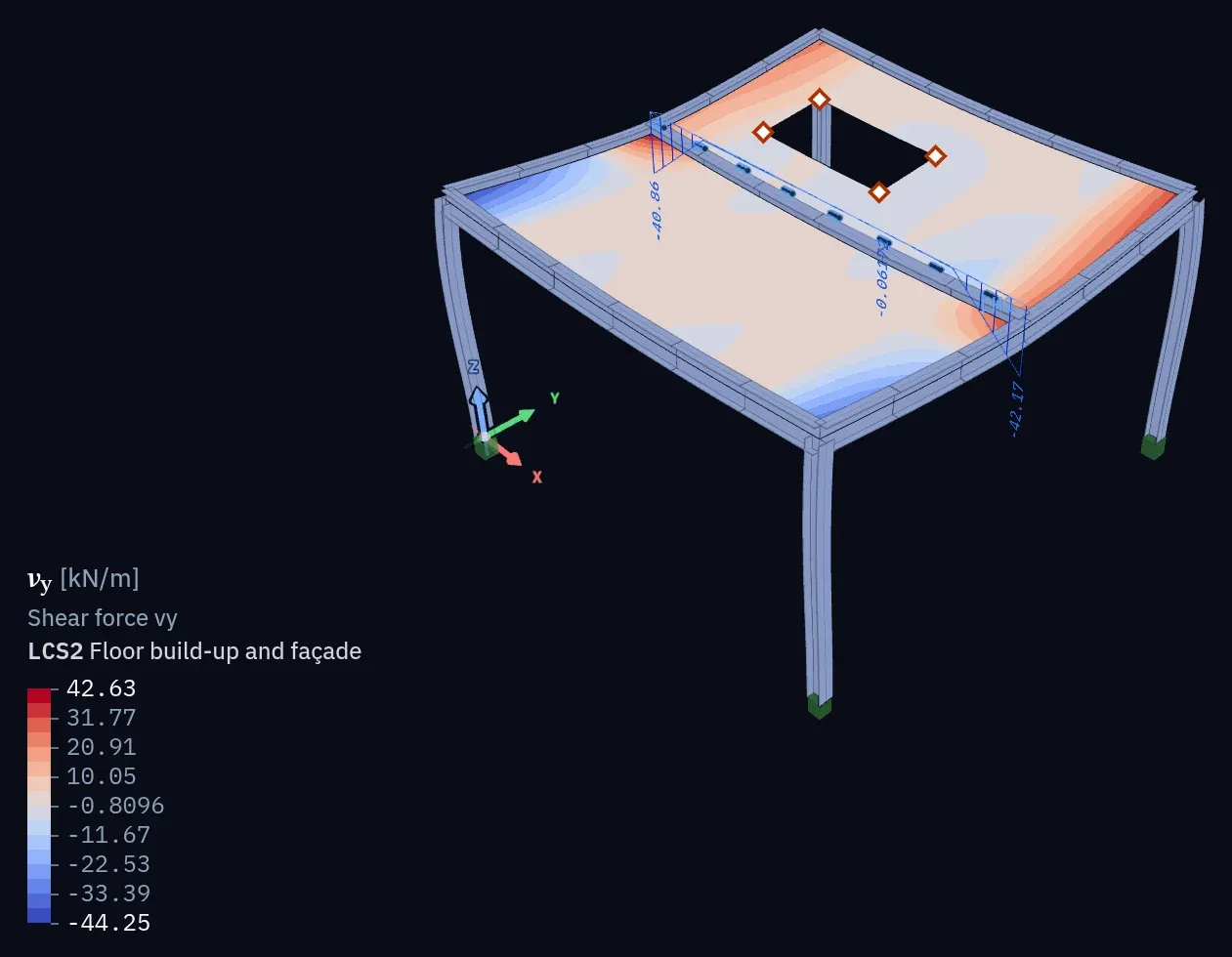
Along a member. Right-click a member to cut it at any point and free the rotations you choose, or release it at a node it runs through.
Where bracing crosses. Connect members where they cross, or join two diagonals with a scissor hinge, no node needed first. Diagonals that cross rigidly get a warning from the model check, with a one-click fix.
Hinges have their own results table, and hinges inside members are read from IFC. Line hinges and releases at a node along a member aren't written to SAF, and the export says so.
Faster
The solver is up to 1.8× faster. Timed through the app's own solve pipeline with each release's solver, on one thread, best of two or three runs:
| What | Model | 0.7.1 | 0.8.0 | Better |
|---|---|---|---|---|
| Linear static, direct | Slab, 61k DoF | 1.25 s | 0.84 s | 1.5× |
| Linear static, iterative | Slab, 61k DoF | 0.98 s | 0.78 s | 1.3× |
| Second order (P-Δ) | Steel frame, 52k DoF | 1.35 s | 0.75 s | 1.8× |
| Buckling, 3 modes | Steel frame, 52k DoF | 2.02 s | 1.65 s | 1.2× |
| Select all plates | Cooling tower, 504 plates | 5.84 s | 69 ms | 85× |
| Plate results ready to draw | 28k plate faces | 274 ms | 15–28 ms | 10–18× |
Times on your machine and model will differ. Long reports now show their first pages within seconds and typeset several times faster, and a changed setting updates the preview much sooner.
Also new
Working with no signal. Open a project on a train and keep editing: every change stays in that browser and syncs by itself once you are back online. We went through syncing end to end, so two people editing different fields of the same load, material or section both keep their changes, and losing the connection no longer signs you out. A project has to have been opened on the device once before it works offline.
Plates mesh themselves. A plate now chooses its own element size: a tenth of its span, at most twice its thickness, never above 1 m, and Properties says which rule set it. Plates with no size of their own are meshed again, so their results can change.
Support settlements are loads of a load case now, at nodes and along line supports, varying from end to end, and scaled by a combination's factor like any other load.
Plates connect wherever they touch: a wall standing on a slab, two walls in a T, slabs whose edges only partly overlap.
The smaller things: Hide and Isolate per viewer, with fit, snapping and the colour scale following what is left. Window and crossing selection. A Place node tool. A start sheet on empty projects. Any model table out to Excel, CSV or the clipboard. Reports that read better: a dot between the numbers, (6 m)² for L², the clause under the formula. A Verify group on the ribbon. Two-factor authentication. And every dialog on tablets and phones.
What is next
Concrete design to EN 1992-1-1 is still the most requested gap, and the next module.
The examples open without an account. And if a check disagrees with your hand calculation, send us the project at [email protected].