Mesh refinements
Refinement zones tied to the model, round a node or column, along a member or edge, or through a polygon, holding a target element size inside.
Meshing 3 min read
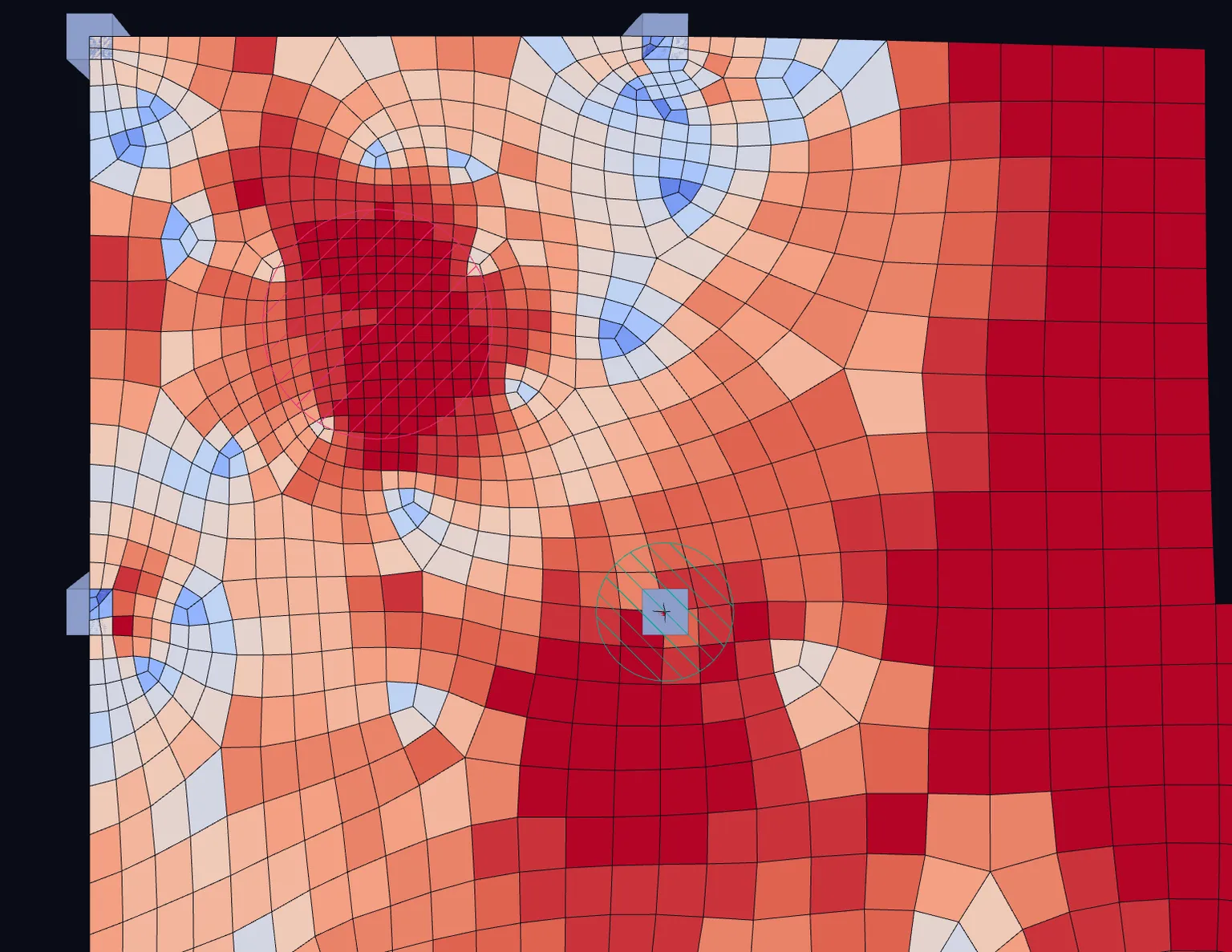
A mesh refinement is an object in the model that sets a target element size inside a region. The mesher treats it as a zone, not a point. The target size holds everywhere inside the region, and the size grows smoothly back to the plate's own size with distance. Measured inside a disk refined to 0.2 m, the average element size was 0.201 m.
Local refinement covers where refinement pays and where it does not. This page covers the tool.
Where a refinement sits
Refinements are tied to the model in the same ways as smoothing regions, so they move with it:
- a circle or rectangle on a node,
- a circle around a column where it meets the slab,
- a strip along a member or wall lying in a plate,
- a strip along a plate edge,
- a polygon through three or more nodes.
Unless you size a region, it follows from the plate, with t its thickness: a circle reaches from its node, being half the diagonal of the column or load patch there. A rectangle is square and a strip is 4 × t wide.
The element size
Size in a refinement's properties is the target size within the region. Leave it empty and it is auto, relative to the plate's own element size where the refinement lies: Local size × element size in the project's mesh settings times , kept between t/4 and t/2. The fraction is 0.25 by default, so four elements stand where the plate has one. If that is no finer than the plate already is, the refinement has no effect, and the field says no effect. Where plates meet, the finest and thinnest t of them apply.
When to use it
- Where you will read a result near a feature: round a column head, at an opening corner, along the end of a wall.
- Inside a smoothing region. You rarely need to add one by hand there: a smoothing region refines the mesh inside itself by default, so its average is taken over a real area.
- Not as a fix for a singular point. At a singular point a finer mesh only makes the peak larger.
Column heads refine the mesh around their footprint automatically, so they need no refinement of their own.
Adding one
- Right-click a singular point and choose Refine the mesh here.
- Right-click a node, a member or a plate and choose Add mesh refinement, or the edge variant on a plate.
- Select three or more nodes for a polygon through them.
- In the properties of a node, member or plate, the Mesh refinements section lists the refinements on it, with an Add button.
To delete one, right-click it and choose Delete mesh refinement, or select it and delete it.
The project rule
Project settings › Mesh › Plates › Refine at point loads refines every plate around its point loads and point supports:
| Setting | Options | Default |
|---|---|---|
| Refine at point loads | Off, Point loads and supports | Off |
| Local size × element size | Element size near each point, as a fraction of the plate's element size there. Shown while the rule is on | 0.25 |
In the viewer
Refinements are drawn as pink hatched outlines. The hatch runs on the opposite diagonal to the smoothing hatch, so both stay readable where a refinement and a smoothing region overlap. Display › Mesh refinements shows or hides them. They are shown in model views and hidden in result views.
Defaults
| Default | |
|---|---|
| Project rule | Off |
| Region round a point | in radius: 2 × plate thickness past what stands on the node |
| Element size inside | 0.25 × the plate's element size, between t/4 and t/2 |
| Drawn | In model views; hidden in result views |
Turning it off
Delete the refinement, or set Refine at point loads to Off for the automatic ones. The plate then meshes at its own size again.
What it does not do
- The mesh is not refined adaptively from an error estimate. Refinement is where you put it, or where the project rule puts it.
- Mesh refinements are not carried by IFC export.
Something wrong or unclear on this page? Tell us, and it gets corrected.